Securing your data in an increasingly insecure world is no easy task. Backing up computer data,installing software that protects you from identity theft are just a few things we do to secure our data. Think about it. Why wouldn’t you want to protect your Android Phone? It’s not only if you physically lose your phone with ALL the data on it. The pictures, emails, contacts, text messages, music, video. You all know that data is not so secure even when the phone is sitting in the palm of your hand. Below, we explore this security issue with real – life examples and give a few recommendations on apps to protect the data you need. At work. In life.
Here are a few common scenarios that we all can relate to:
You’re sitting in a cafe waiting for a co-worker and the media player app (at least that’s what you thought it was) you just downloaded while on the train to work just started sending SMS messages to all your contacts (Including International) racking up a huge phone bill.
A hacker sends an email or text which appears to be from a trusted source, like your mobile carrier. The message urges you to click on a link, which if you do, infects the device. At this point the hacker gains complete control of your phone, enabling them to eavesdrop on conversations or to monitor the location of your device. Talk about invasion of privacy!
Bitdefender, the creator of award-winning, internationally certified Internet Security and Antivirus software revealed in a recent study on mobile security, that there were over 100 new malware families detected in 2011, as compared to the 3 to 4 malware versions in 2010.
Below is a list of apps we think you’ll find handy. Like any of them? Have any experience with them? Any stories to share? Sharing is appreciated and your recommendations might just make the next list. Please leave any comments below.
This app provides free security protection, backs up your contacts and has a location feature for phones and tablets. The app also includes a premium version upgrade for $2.99 a month or $29.99 a year which gives you added features such as safe browsing, privacy advisor, a backup of pictures, your call history and remote locking and wiping.
This app allows you to lock any application on your phone: Message, Gmail, Photo, SMS. Any app you choose. You can choose to lock sensitive apps only and leave the rest unlocked.
There are many Twitter apps on Android - and Twitter itself shook up the scene with the launch of its own-brand app - but we're sticking withSeesmic. Offering support for multiple accounts, a home page widget showing latest tweets and an incredibly slick and professional design, it's one of the finest examples of app development out there today.
Facebook for Android is lacking in features compared to Facebook itself, but a recent update added Inbox support to the Android app, finally allowing its users to communicate in almost real time. The app's fast and stable, with a simplicity that reminds you of the old days when using Facebook used to be bearable.
3. National Rail Enquiries
After the original free, third-party National Rail apps went paid-for, National Rail has finally brought out its own free app. National Rail Enquiriesenables you to check live train times, plan your journeys, and get notifications of delays. On first use, the app prompts you to enter a home and work train station, and then you can use the 'Get me home' button to see the next available trains.
4. UK Jobs
Hey, times are hard and you've got to pay for your oppressive monthly mobile phone contract somehow. Offering a fully searchable database of current UK job vacancies, UK Jobs, which pulls in its data from independent employment site 1job.co.uk is, a slightly cumbersome but useful and non-governmental tool.
5. Hotmail/Outlook
Microsoft has teamed up with developer SEVEN to offer an official Hotmail app for Android, which gives users a simple, clean interface, push notification support and even lets you manage multiple Hotmail accounts from within the app. If your email needs haven't yet been assimilated by Google, it's a useful option. It's since been rebranded as the Outlook app, in keeping with Microsoft's changes to its mail site.
A stunning app that renders Patrick Moore obsolete, by using your phone's orientation tools to give you an accurate representation of the stars and planets on your screen. Point your phone at the sky, then learn what constellations are visible and if that's a UFO or just Venus. Google Sky Map even works indoors, if you're not keen on getting cold.
7. Layar
The stunning augmented reality app Layar has recently gone commercial, adding an online shop that allows users to buy AR content such as travel guides, local house price apps and much more. But you're still able to use the numerous free Layers to pop data up over real-world locations, delivering a satisfying futuristic experience.
8. Foursquare
The social media darling Foursquare is represented in fine form on Android, with the Google app offering easy one-click check-ins, integrated Google Maps for a seamless Google-branded experience and home page shortcut options to all your favourite places.
9. WordPress for Android
WordPress for Android started out as independent creation wpToGo, before WordPress decided it liked it so much it bought it up - hiring the maker to develop it in-house. It's very feature-packed, with the latest version offering full integration with other apps, letting you spin content and send it directly to the app for easy updating. It could do with more image insertion tools, though.
10. Google Goggles
A bit of a novelty, in that Google Goggles lets you take photos and have Google analyse them and come back with a search results page for what it thinks you're looking at. However, the app's main use is as a QR code reader, which lets you scan barcodes for quick access to apps and whatever data people choose to embed in the odd little data squares.
Yes, the same Winamp from a decade ago. It's had an Android app for some time, with recent updates adding support for iTunes, Mac syncing, plenty of music streaming options, new release lists and Shoutcast integration for radio support. It's a fine, free media player.
12. Samsung ChatOn
There are plenty of messaging tools on Android, but Samsung's beats many of them by offering multi-platform support - with clients even available for older Samsung non-smart feature phones. It could be the ideal way to keep in touch with an out of touch relative. More "with it" users will be able to use its drawing, image sharing and social networking features.
13. Skyfire 3.0
The USP of the Skyfire browser is that it supports Flash content, popping up a little window when it detects an embedded YouTube video or something similar. The actual Flash business is handled by Skyfire's server, which does all the computery stuff, then sends the file to your handset. A bit clunky on slower Android phones, but it works like a dream on models with faster processors.Despite the arrival of Flash with Android 2.2, this is still relevant for those on phones and Android versions not able to support Adobe's Flash Player.
14. BBC News
While the BBC's Android iPlayer app is a bit on the disappointing side, the corporation's BBC News app is much more refined. There's a stylish grid-based front page, plus you're able to swipe from left to right to switch between stories in your chosen specialist category. A recent update also added a couple of Home screen widgets, too, plus the ability to submit your own news tips, as if the BBC was a small blog clamouring for content.
15. RAC Traffic
An official production of the motoring organisation, RAC Traffic is dead simple - it guesstimates your location via the mobile signal, then pops up the current traffic alerts for your area. It's much better than having to listen to the radio for the odd update about arterial blockages.
16. Swype
The odd line-drawing alternate keyboard Swype is a love-it or hate-it kind of thing, with the significant amount of re-learning required to make the most of it quite offputting to some users. Once you're familiar with the idea, though, it's genius - with advanced prediction options further speeding your line-typing. Swype is not available through the Android Market - the only way to install is is via a direct download from the maker.
17. Evernote
After the Android version of Dropbox, the next best solution for keeping all your 'business' in one place is Evernote - which lets you stash and sync all your text notes, voice memos and files on your phone and access them through a desktop computer.
18. Flickr
As well as supporting Flickr uploading, this app also lets you capture photos from within the app and comes complete with a set of filters, so you can hipsterise your life with ease. It supports sharing with Twitter and Facebook as well, so your other, non-photo-nerd friends can enjoy the results of today's snapping session.
19. Last.fm
The subscription-based thrills of Last.fm open up a world of music streaming on your mobile. You have to 'buy in' to the odd Last.fm way of organising things and suggesting new music, but if you're easily led and not restricted by bandwidth it's a superb tool.
20. Google Maps Navigation
An absolute must-get. As long as you have Android 1.6 or above, the latest update to Google Maps introduces turn-by-turn voice navigation, simultaneously devastating the satnav industry while boosting the in-car dashboard dock/charger accessory scene. Route calculations are done at the outset of your trip, minimising data transfer en route and keeping you on target even when the GPS signal drops. It's amazing, it works, and it's free.
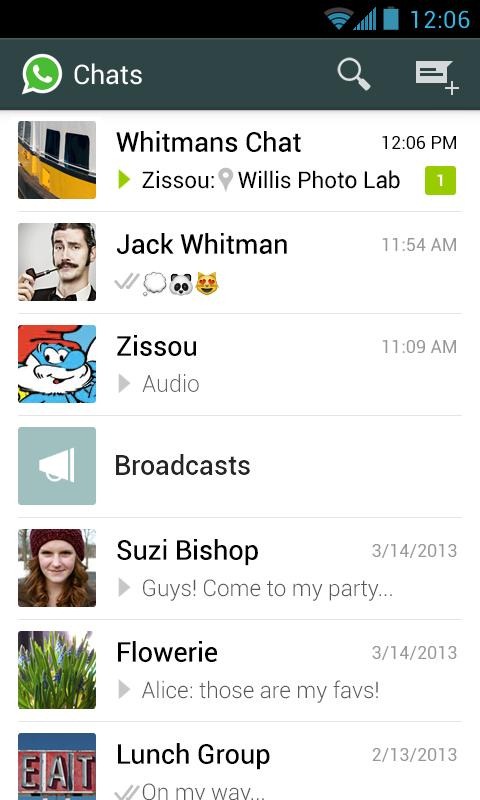
The most popular standalone chat platform on Android, WhatsApp, has been updated with a whole new look - and it's holo-y. About a month ago, WhatsApp previewed its redesigned aesthetic in a beta release, and now those changes have made their way into the release client. While the changelog is pretty sparse on details ('update user interface to the latest android look and feel'), compared to the old version of the app, the visual differences should be fairly obvious.
There's also mention of three and five-year subscription discount options, should you plan your proprietary chat platform usage that far out, and support for Vietnamese. New users still get a year of the app for free, and will be charged $0.99 a year thereafter. Head to the Play Store to grab the new update now.
Even though Verizon is not known for having a speedy update approval process, owners of the Galaxy Tab 2 7.0 and Galaxy Tab 2 10.1 are finally about to win the Jelly Bean lottery. The OTAs will bring each device up to Android 4.1.2.
The full list of changes is pretty significant for both tablets. Naturally, a bump from ICS to JB will bring Google Now, offline voice typing, expandable notifications, and several other enhancements and bug fixes. Additionally, each tablet will receive a number of improvements to Samsung's own software:
Zooming solution in the user interface has been implemented
Translucent icons can now be non-translucent or opaque
Sync and Connect email server has been updated
Improvements have been made to Back Up Assistant Plus
Music player application has been updated
Pages for the recently approved updates are currently adorned with the words "Coming Soon," generally meaning notifications should start appearing in the next few days. The OTAs are fairly large at 549.6 MB for the Tab 2 7.0 and 511.7 MB for the Tab 2 10.1, so a speedy Wi-Fi connection is definitely recommended.
Ingress has just been updated today to give users the ability to submit and update portal location information. For existing portals, players at those portals can now submit new photos that they feel better show the location. You can also now submit suggestions for improvements to the portal name, description or location information. For areas that users think would be good portal locations but aren't yet, they can submit a photo and information for consideration to open a portal there.
The update also claims to improve GPS location accuracy and stability, along with a host of nondescript "bugfixes and performance improvements". If you're a hardcore Ingress player, this will be an update to get. You can grab an update or download of the latest version from the Play Store link above.
The Sony SmartWatch controller app is receiving an update that brings several new flashy watch faces and increased functionality to the accessory. The new watch faces cover all the bases -- analog, digital, abstract -- and come in different colors as well. The update also brings improved battery level information, notification previews from your device and improvements to search when looking for new apps for the SmartWatch.
The app should also now be easier to get installed on non-Sony devices, which is a plus. If you happen to be using a Sony SmartWatch, you can grab a download or update to the app at the top of this post.
Pocket Casts just received an update to version 4.1, bringing a new "dark" theme and several notable playback improvements. Even though it just recently made the major jump to version 4 with a complete redesign, the updates don't stop there. Version 4.1 has a new dark theme, which should be easier on the eyes when viewing in dim environments and generally just please the crowd that likes a darker UI. On the playback side, v4.1 adds global playback speed options, set "start from" times for episodes, larger buttons and various other little fixes.
If you haven't taken a look yet, the new and redesigned Pocket Casts 4 is certainly worth consideration. You can grab a download from the Play Store at the link above, and stick around after the break for a quick side-by-side comparison of the light and dark UI.
IK Multimedia first announced that their iRig Recorder app would be coming to Android back at CES in early January. Back then, we were told to expect it to land by the end of January. All went quiet, January became a memory, and the app never appeared for download. Better late than never though, iRig Recorder is now available as a free download from the Google Play Store. While the app is free, full functionalities can be unlocked for the one time fee of $4.99.
Besides being a full featured recording and editing app, iRig Recorder is compatible with the existing iRig hardware, previously only supported by iOS devices. Accessory makers have been notoriously slow to adopt Android, but the arrival of the iRig suite of audio equipment and the Recorder app is fantastic news for anyone who needs to make good quality recordings on the go.


 Securing your data in an increasingly insecure world is no easy task. Backing up computer data,installing software that protects you from identity theft are just a few things we do to secure our data. Think about it. Why wouldn’t you want to protect your Android Phone? It’s not only if you physically lose your phone with ALL the data on it. The pictures, emails, contacts, text messages, music, video. You all know that data is not so secure even when the phone is sitting in the palm of your hand. Below, we explore this security issue with real – life examples and give a few recommendations on apps to protect the data you need. At work. In life.